How the discount is applied
The pricing rules run as a Shopify Function: code that Shopify executes itself, inside checkout, on every cart change. Nothing is calculated on our servers, and no cart data leaves Shopify.
The automatic discount
A function only runs when a discount points at it. On your first admin load the app creates one automatic app discount for that purpose, and reuses it from then on. You will see it in Discounts in your Shopify admin, named after the app.
Leave it in place. If it is deleted, the app creates it again on the next admin load. It carries two discount classes, order and product, because the app emits both kinds of effect: complete sets discount the order, pair bundles discount lines.
How the amount is calculated
Pair bundles discount cart lines.
- A percentage takes that percentage off each targeted line.
- A fixed amount comes off the targeted line once, not once per unit.
- Targeted lines are the add-on’s lines, or both products’ lines if the bundle is set to Both products.
Complete sets discount the order subtotal, with every cart line that is not a member of that set excluded. So a set reward applies to the member products in the cart and not to anything else the buyer happens to be carrying.
- A percentage takes that percentage off the member lines’ subtotal.
- A fixed amount comes off that subtotal once.
A percentage above 100 is treated as 100. A value of zero or below, or a value that cannot be read, falls back to the store default reward, and if there is no usable store default the candidate is dropped.
A worked example
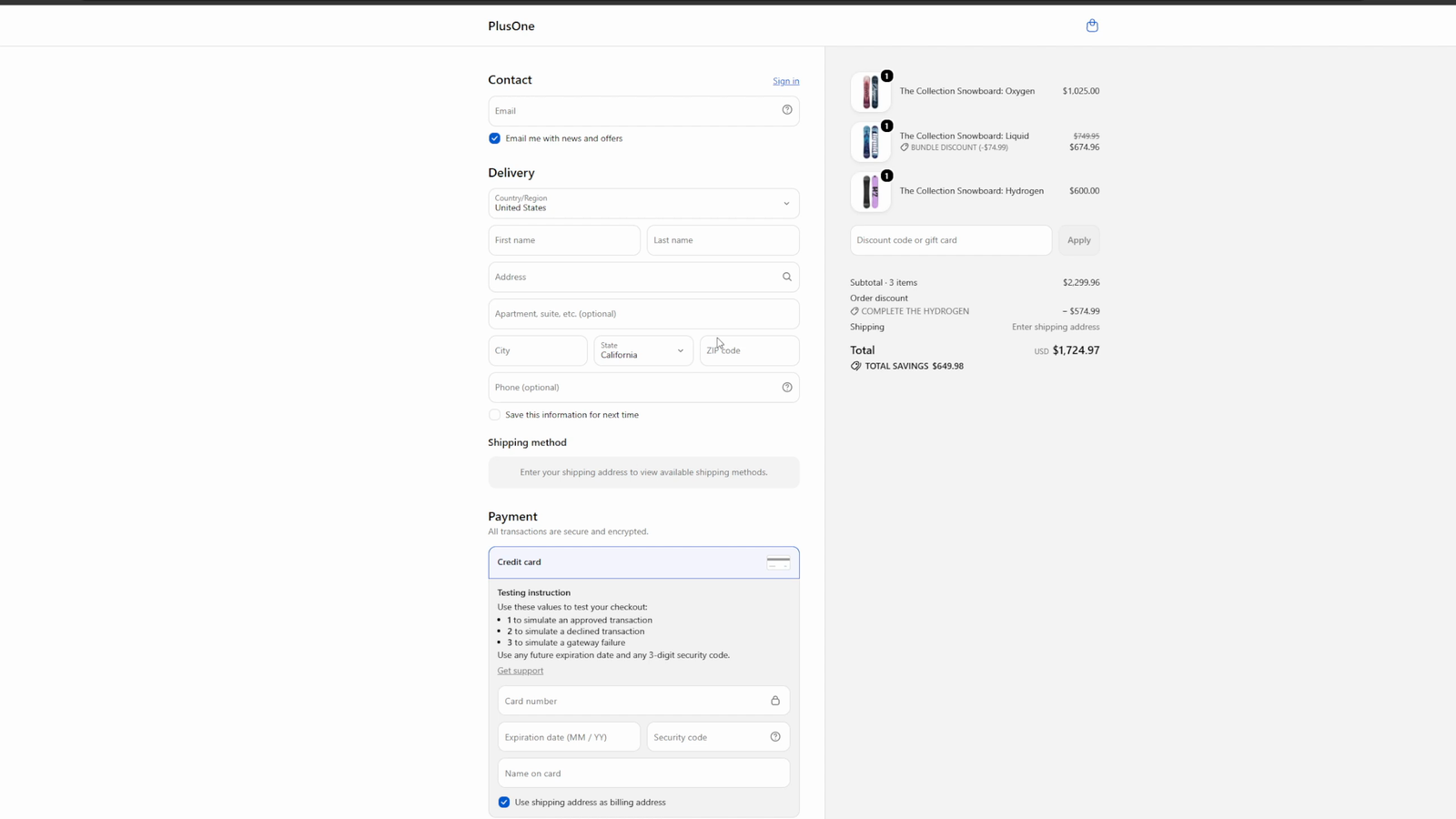
The rules above, applied to one cart. These are the numbers from the app’s own test store.
The cart holds three snowboards: Oxygen at $1,025.00, Liquid at $749.95, Hydrogen at $600.00. Two offers exist:
- a pair bundle, Hydrogen with Liquid as the add-on, at 10% off the add-on only,
- a complete set of all three, at 25% off.
What checkout does:
- The pair qualifies, because both Hydrogen and Liquid are in the cart. Liquid’s line is discounted by 10%: $749.95 becomes $674.96, a saving of $74.99.
- The set qualifies, because all three of its items are in the cart. Its reward applies to the member lines’ subtotal, which by now is $1,025.00 + $674.96 + $600.00 = $2,299.96. Twenty five percent of that is $574.99.
- The buyer sees a subtotal of $2,299.96, an order discount line of $574.99 labelled with the set name, and total savings of $649.98.
Combining with your other discounts
The discount the app creates is set to combine with product discounts and with shipping discounts, and not with other order discounts. Two order-level discounts on one cart would double up on the same money, which is why that one is off.
Shopify only combines two discounts when both of them are set to combine with the other’s class, so the discount on the other side (automatic or code) has to allow it too. A discount code your buyer types is subject to the same rule: if the code is a product discount that permits combining with order discounts, it can sit alongside a complete set reward; if it is an order discount, it cannot.
If someone edits the app’s discount in Shopify admin and removes one of its two classes, the matching half of the app stops applying. The app widens the classes back the next time it checks.
What makes it safe to leave running
The function is written so that anything it cannot understand resolves to “no discount” rather than to an error. Malformed configuration, missing fields, an empty cart, gift card lines and custom line items all pass through without a discount and without breaking checkout.
On uninstall
Shopify removes the app’s automatic discount when the app is uninstalled, so bundle and set discounts stop applying at that point. Your products, collections and orders are untouched.